mirror of
https://github.com/Threnklyn/nton.git
synced 2026-05-18 21:03:28 +02:00
 rlaphoenix
171 lines
8.1 KiB
Markdown
171 lines
8.1 KiB
Markdown
# NTON
|
|
|
|
[](https://github.com/rlaphoenix/nton/actions/workflows/ci.yml)
|
|
[](https://pypi.python.org/pypi/nton)
|
|
[](https://pypi.python.org/pypi/nton)
|
|
<a href="https://github.com/rlaphoenix/nton/blob/master/LICENSE">
|
|
<img align="right" src="https://img.shields.io/badge/license-GPLv3-blue" alt="License (GPLv3)"/>
|
|
</a>
|
|
|
|
NTON is a Nintendo Switch NRO to NSP Forwarder for firmware 12.0.0 and newer.
|
|
|
|
A forwarder lets you open a Homebrew NRO file from your SD card through the Nintendo Switch Home Screen instead
|
|
of the Homebrew Launcher.
|
|
|
|
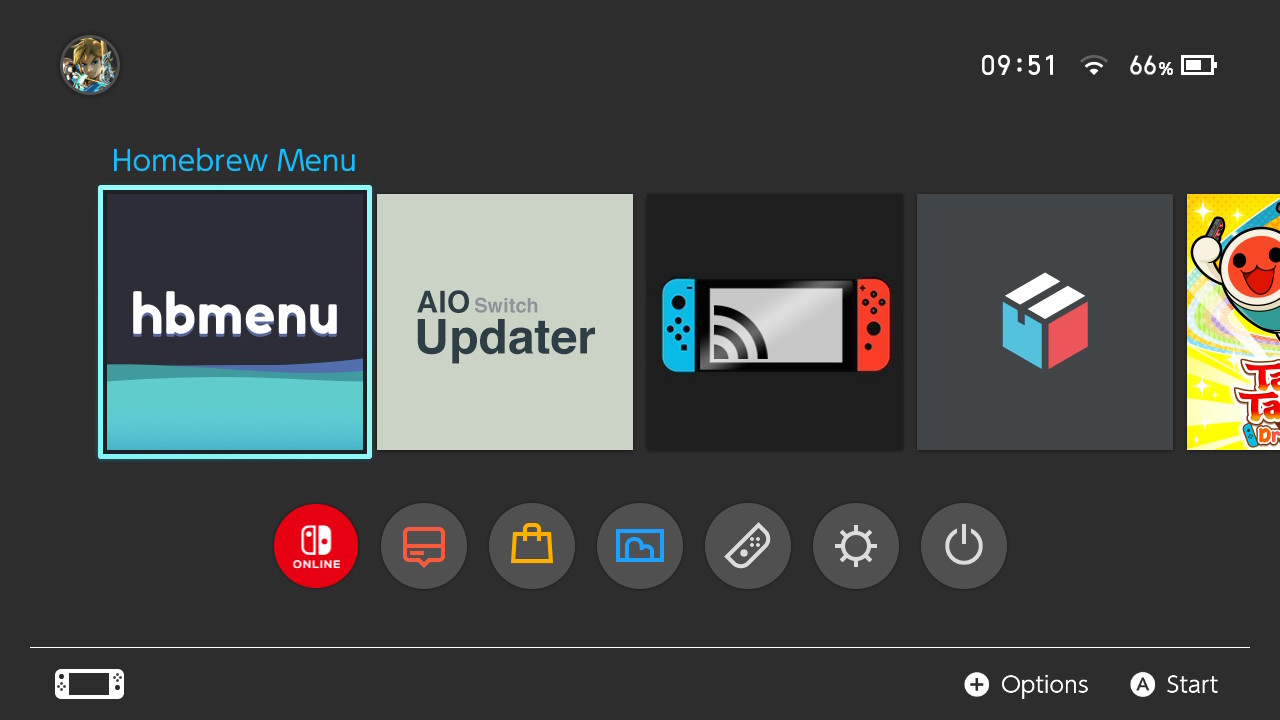
|
|
*Preview of 4x Forwarders made with NTON.*
|
|
|
|
## Features
|
|
|
|
- 🛡️ Safety-first approach; System/Game Title IDs cannot be used and NRO files are validated
|
|
- 🕹️ Boot right into an Emulated Game with Direct RetroArch Game Forwarding
|
|
- 🖼️ Supports any Image file of any resolution or format for the NSP Icon
|
|
- 🤖 The Title Name, Publisher, Icon, and more are automatically extracted from the NRO
|
|
- 🎥 Supports Video Capture and Screenshots
|
|
- ⚙ Currently Supports Firmware 12.0.0 and up
|
|
- 🧩 Plug-and-play installation via PIP/PyPI
|
|
- ❤️ Forever FOSS!
|
|
|
|
## Installation
|
|
|
|
*Note: Requires [Python] 3.7.0 or newer with PIP installed.*
|
|
|
|
```shell
|
|
$ pip install nton
|
|
```
|
|
|
|
You now have the `nton` package installed and a `nton` executable is now available.
|
|
Check it out with `nton --help` - Voilà 🎉!
|
|
|
|
*If you see any warnings about a path not being in your PATH environment variable, add it, or `nton` won't run.*
|
|
|
|
### Dependencies
|
|
|
|
The following is a list of programs required to be installed manually.
|
|
I recommend installing these with [winget] or [chocolatey] where possible as it automatically adds them to your
|
|
`PATH` environment variable and will be easier to update in the future.
|
|
|
|
- [hacBrewPack] for packing the NSP.
|
|
- [ImageMagick] for Icon conversion and preparation.
|
|
- [nstool] for NRO extraction and verification.
|
|
- [hptnacp] for creating new NACP partitions if the NRO did not have one.
|
|
|
|
For portable downloads, make sure you put them in your current working directory, in the installation directory,
|
|
or put the directory path in your `PATH` environment variable. If you do not do this then NTON will not be able to
|
|
find any of the binaries.
|
|
|
|
[winget]: <https://winget.run>
|
|
[chocolatey]: <https://chocolatey.org>
|
|
[hacBrewPack]: <https://github.com/The-4n/hacBrewPack>
|
|
[ImageMagick]: <https://imagemagick.org/script/download.php>
|
|
[nstool]: <https://github.com/jakcron/nstool>
|
|
[hptnacp]: <https://github.com/The-4n/hacPack/tree/master/hacPack-Tools/hacPackTools-NACP>
|
|
|
|
### Keys
|
|
|
|
NTON requires the use of proprietary key data for use in various ways.
|
|
|
|
Place your `prod.keys` file at `C:\Users\<User>\.switch\prod.keys` or in your current working directory for
|
|
NTON to be able to find and use your keys.
|
|
|
|
Make sure your `prod.keys` file is up-to-date for the firmware version your Nintendo Switch is on. It can be extracted
|
|
from your Nintendo Switch with [Lockpick_RCM](https://github.com/shchmue/Lockpick_RCM).
|
|
|
|
### From Source Code
|
|
|
|
The following steps are instructions on downloading, preparing, and running the code under a Poetry environment.
|
|
You can skip steps 3-5 with a simple `pip install .` call instead, but you miss out on a wide array of benefits.
|
|
|
|
1. `git clone https://github.com/rlaphoenix/nton`
|
|
2. `cd nton`
|
|
3. (optional) `poetry config virtualenvs.in-project true`
|
|
4. `poetry install`
|
|
5. `poetry run nton --help`
|
|
|
|
As seen in Step 5, running the `nton` executable is somewhat different to a normal PIP installation.
|
|
See [Poetry's Docs] on various ways of making calls under the virtual-environment.
|
|
|
|
[Python]: <https://python.org>
|
|
[Poetry]: <https://python-poetry.org>
|
|
[Poetry's Docs]: <https://python-poetry.org/docs/basic-usage/#using-your-virtual-environment>
|
|
|
|
## Usage
|
|
|
|
Take a look at `nton --help`, specifically `nton build --help`.
|
|
If you simply want to take an NRO and get an NSP forwarder, simply run `nton build "<nro path>"`.
|
|
|
|
Note that the NRO path MUST be on your Switch microSD card. Do not provide a path in your C:/ Drive or such.
|
|
Two different kinds of paths are used based on the initial file path, therefore it must be from your Switch microSD
|
|
card.
|
|
|
|
E.g., to make a forwarder for the Homebrew Menu that's on your Switch's microSD at `D:\hbmenu.nro`, simply run
|
|
`nton build "D:/hbmenu.nro"`
|
|
|
|
Take a look at `nton build --help` for advanced usage like changing the Icon, Title Name, and so on.
|
|
|
|
### Direct RetroArch Game forwarding
|
|
|
|
Use a RetroArch Game Core as the NRO path and provide the path to the ROM on your Switch's microSD card with `--rom`.
|
|
This will then load the Core directly under RetroArch and provide the path to the ROM as a startup argument to the
|
|
RetroArch Core.
|
|
|
|
Note:
|
|
|
|
- You must use a path to a RetroArch Game Core NRO, not the path to the RetroArch NRO itself.
|
|
- Do not move, delete, or rename the ROM or the Core NRO files that are on your microSD card, or it will break.
|
|
|
|
## Troubleshooting
|
|
|
|
Before continuing try running the homebrew from the Homebrew Launcher and see if it works through there.
|
|
If it does not work through the Homebrew launcher either, then it was never the forwarder's fault and you should
|
|
check on your NRO or application installation.
|
|
|
|
Please note that using Forwarders others have created has a good chance of not working on your system.
|
|
The location of the NRO on their system may differ from the location on your system, hence the NSP won't be able
|
|
to load the homebrew.
|
|
|
|
### The forwarder does not launch, "The software was closed because an error occurred."
|
|
|
|
You're sigpatches that allow non-signed software to launch is outdated or not set up correctly.
|
|
The `prod.keys` you used to create the NSP may also be outdated. Get new ones with [Lockpick_RCM] and
|
|
make sure you choose to get keys from whichever SysNAND or EmuNAND is actually on the latest firmware.
|
|
|
|
### The forwarder starts loading but then crashes
|
|
|
|
If it gets to the black loading screen with the Nintendo Switch logo, but then crashes, you may be setting
|
|
the NRO path wrong when making the NSP. Make sure it starts with `/` and is an absolute path to an existing
|
|
NRO file on your Switch's microSD card. The path you built for must be where the NRO file lies in your Switch's
|
|
microSD card, not your PC.
|
|
|
|
### The forwarder's icon is a '?'
|
|
|
|
The `icon_AmericanEnglish.dat` is not to the spec that Nintendo likes in some way. This is usually caused by the format of the
|
|
image not being a JPEG, or it has EXIF data or an embedded color space.
|
|
|
|
I recommend stripping all EXIF metadata and saving without an Embed Color Space. You can do this quickly with ImageMagick,
|
|
`magick mogrify -format jpg -resize 256x256 -strip "C:\Users\John\Downloads\icon.png"`.
|
|
|
|
### The forwarder randomly stopped working after a while, I changed nothing!
|
|
|
|
You most likely updated your Switch's Firmware and need to update your sigpatches. If not, you may have deleted the NRO from
|
|
your Switch's microSD card or moved the NRO somewhere else. It cannot be moved as the built NSP loads the NRO at the specified
|
|
path when you ran `build`.
|
|
|
|
It's also possible the firmware update has broken the [forwarder ROM][ROM] that is used and needs to be fixed.
|
|
Firmware 9.0.0 and 12.0.0 are times the firmware has broken different forwarder ROMs in the past.
|
|
|
|
## Credit
|
|
|
|
- [meliodas2255] for their [Open-Source forwarder ROM][ROM] supporting v12.0.0+ with both direct RetroArch Forwarding
|
|
and general forwarding both supported.
|
|
- [vgmoose] for the [sdl-hello-world] NRO that is used in CI/CD testing.
|
|
|
|
[meliodas2255]: <https://gbatemp.net/members/meliodas2255.410353>
|
|
[vgmoose]: <https://github.com/vgmoose>
|
|
[ROM]: <https://github.com/Skywalker25/Forwarder-Mod>
|
|
[sdl-hello-world]: <https://github.com/vgmoose/sdl-hello-world>
|
|
|
|
## License
|
|
|
|
[GNU General Public License, Version 3.0](LICENSE)
|