# NTON
[](https://github.com/rlaphoenix/nton/actions/workflows/ci.yml)
[](https://pypi.python.org/pypi/nton)
[](https://pypi.python.org/pypi/nton)
 NTON is a Nintendo Switch NRO to NSP Forwarder for firmware 12.0.0 and newer.
A forwarder lets you open a Homebrew NRO file from your SD card through the Nintendo Switch Home Screen instead
of the Homebrew Launcher.
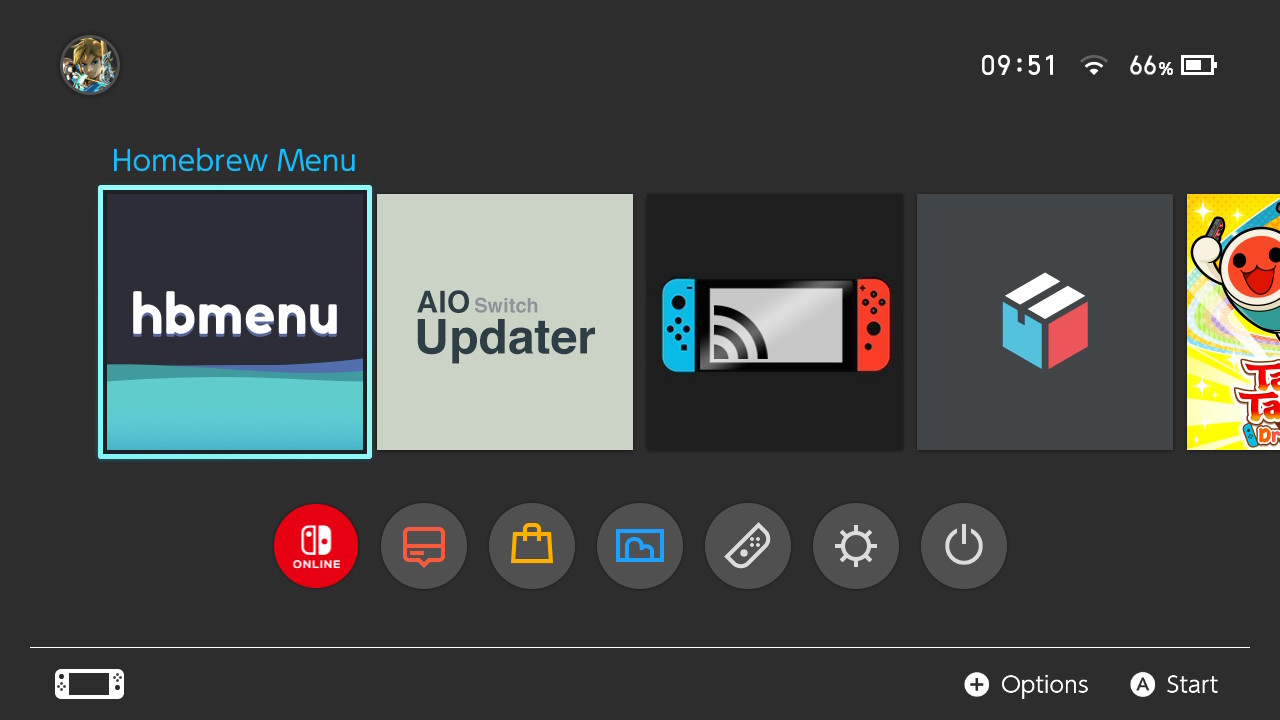
*Preview of 4x Forwarders made with NTON.*
The exefs ROM used is the one by [meliodas2255] which was based on or inspired by the original v12.0.0 ROM by [mpham].
Both ROMs are supported as they use the same romfs structure for specifying which NRO to load from the microSD card.
Simply replace the assets in the `/assets/exefs` folder with the [original ROM][ROM]'s exefs files.
## Features
- 🛡️ Safety-first approach; System/Game Title IDs cannot be used and NRO files are validated
- 🕹️ Boot right into an Emulated Game with Direct RetroArch Game Forwarding
- 🖼️ Supports any Image file of any resolution or format for the NSP Icon
- 🤖 The Title Name, Publisher, Icon, and more are automatically extracted from the NRO
- 🎥 Supports Video Capture and Screenshots
- ⚙ Currently Supports Firmware 12.0.0 and up
- 🧩 Plug-and-play installation via PIP/PyPI
- ❤️ Forever FOSS!
## Installation
*Note: Requires [Python] 3.7.0 or newer with PIP installed.*
```shell
$ pip install nton
```
You now have the `nton` package installed and a `nton` executable is now available.
Check it out with `nton --help` - Voilà 🎉!
*If you see any warnings about a path not being in your PATH environment variable, add it, or `nton` won't run.*
### Dependencies
The following is a list of programs required to be installed manually.
I recommend installing these with [winget] or [chocolatey] where possible as it automatically adds them to your
`PATH` environment variable and will be easier to update in the future.
- [hacBrewPack] for packing the NSP.
- [ImageMagick] for Icon conversion and preparation.
- [nstool] for NRO extraction and verification.
For portable downloads, make sure you put them in your current working directory, in the installation directory,
or put the directory path in your `PATH` environment variable. If you do not do this then NTON will not be able to
find any of the binaries.
[winget]:
[chocolatey]:
[hacBrewPack]:
[ImageMagick]:
[nstool]:
### Keys
NTON requires the use of proprietary key data for use in various ways.
Place your `prod.keys` file at `C:\Users\\.switch\prod.keys` or in your current working directory for
NTON to be able to find and use your keys.
Make sure your `prod.keys` file is up-to-date for the firmware version your Nintendo Switch is on. It can be extracted
from your Nintendo Switch with [Lockpick_RCM](https://github.com/shchmue/Lockpick_RCM).
### From Source Code
The following steps are instructions on downloading, preparing, and running the code under a Poetry environment.
You can skip steps 3-5 with a simple `pip install .` call instead, but you miss out on a wide array of benefits.
1. `git clone https://github.com/rlaphoenix/nton`
2. `cd nton`
3. (optional) `poetry config virtualenvs.in-project true`
4. `poetry install`
5. `poetry run nton --help`
As seen in Step 5, running the `nton` executable is somewhat different to a normal PIP installation.
See [Poetry's Docs] on various ways of making calls under the virtual-environment.
[Python]:
[Poetry]:
[Poetry's Docs]:
## Usage
Take a look at `nton --help`, specifically `nton build --help`.
If you simply want to take an NRO and get an NSP forwarder, simply run `nton build ""`.
Note that the NRO path MUST be on your Switch microSD card. Do not provide a path in your C:/ Drive or such.
Two different kinds of paths are used based on the initial file path, therefore it must be from your Switch microSD
card.
E.g., to make a forwarder for the Homebrew Menu that's on your Switch's microSD at `D:\hbmenu.nro`, simply run
`nton build "D:/hbmenu.nro"`
Take a look at `nton build --help` for advanced usage like changing the Icon, Title Name, and so on.
### Direct RetroArch Game forwarding
Use a RetroArch Game Core as the NRO path and provide the path to the ROM on your Switch's microSD card with `--rom`.
This will then load the Core directly under RetroArch and provide the path to the ROM as a startup argument to the
RetroArch Core.
Note:
- You must use a path to a RetroArch Game Core NRO, not the path to the RetroArch NRO itself.
- Do not move, delete, or rename the ROM or the Core NRO files that are on your microSD card, or it will break.
## To-do
- [X] Rewrite as a Python script to heavily improve the user experience and code.
- [X] Combine the Drive letter and Path arguments and manually split them when they need to be separate instead.
- [X] Automate name and publisher by extracting from the extracted `control.nacp`.
- [X] Force enable video capture and screenshots in the extracted `control.nacp`.
- [x] Add support for direct RetroArch Game Forwarding.
- [ ] Force disable save data allocation. Fixed in [v3.3.5 of Nro2NSP](https://github.com/Root-MtX/Nro2Nsp/releases/tag/3.3.5).
- [ ] Maybe a new GUI one day, and let you override the icons and such?
## Troubleshooting
Before continuing try running the homebrew from the Homebrew Launcher and see if it works through there.
If it does not work through the Homebrew launcher either, then it was never the forwarder's fault and you should
check on your NRO or application installation.
Please note that using Forwarders others have created has a good chance of not working on your system.
The location of the NRO on their system may differ from the location on your system, hence the NSP won't be able
to load the homebrew.
### The forwarder does not launch, "The software was closed because an error occurred."
You're sigpatches that allow non-signed software to launch is outdated or not set up correctly.
The `prod.keys` you used to create the NSP may also be outdated. Get new ones with [Lockpick_RCM] and
make sure you choose to get keys from whichever SysNAND or EmuNAND is actually on the latest firmware.
### The forwarder starts loading but then crashes
If it gets to the black loading screen with the Nintendo Switch logo, but then crashes, you may be setting
the NRO path wrong when making the NSP. Make sure it starts with `/` and is an absolute path to an existing
NRO file on your Switch's microSD card. The path you built for must be where the NRO file lies in your Switch's
microSD card, not your PC.
### The forwarder's icon is a '?'
The `icon_AmericanEnglish.dat` is not to the spec that Nintendo likes in some way. This is usually caused by the format of the
image not being a JPEG, or it has EXIF data or an embedded color space.
I recommend stripping all EXIF metadata and saving without an Embed Color Space. You can do this quickly with ImageMagick,
`magick mogrify -format jpg -resize 256x256 -strip "C:\Users\John\Downloads\icon.png"`.
### The forwarder randomly stopped working after a while, I changed nothing!
You most likely updated your Switch's Firmware and need to update your sigpatches. If not, you may have deleted the NRO from
your Switch's microSD card or moved the NRO somewhere else. It cannot be moved as the built NSP loads the NRO at the specified
path when you ran `build`.
It's also possible the firmware update has broken the [forwarder ROM][ROM] that is used and needs to be fixed.
Firmware 9.0.0 and 12.0.0 are times the firmware has broken different forwarder ROMs in the past.
## Credit
- [Martin Pham (mpham)][mpham] for the [original forwarder ROM][ROM] supporting v12.0.0+, and original batch script.
- [meliodas2255] for [their forwarder ROM][ROM2] also supporting v12.0.0+ compiled with the latest hbl-loader as of May
2021, with both direct RetroArch Forwarding and general forwarding support.
[mpham]:
[meliodas2255]:
[ROM]:
[ROM2]:
## License
[GNU General Public License, Version 3.0](LICENSE)
NTON is a Nintendo Switch NRO to NSP Forwarder for firmware 12.0.0 and newer.
A forwarder lets you open a Homebrew NRO file from your SD card through the Nintendo Switch Home Screen instead
of the Homebrew Launcher.

*Preview of 4x Forwarders made with NTON.*
The exefs ROM used is the one by [meliodas2255] which was based on or inspired by the original v12.0.0 ROM by [mpham].
Both ROMs are supported as they use the same romfs structure for specifying which NRO to load from the microSD card.
Simply replace the assets in the `/assets/exefs` folder with the [original ROM][ROM]'s exefs files.
## Features
- 🛡️ Safety-first approach; System/Game Title IDs cannot be used and NRO files are validated
- 🕹️ Boot right into an Emulated Game with Direct RetroArch Game Forwarding
- 🖼️ Supports any Image file of any resolution or format for the NSP Icon
- 🤖 The Title Name, Publisher, Icon, and more are automatically extracted from the NRO
- 🎥 Supports Video Capture and Screenshots
- ⚙ Currently Supports Firmware 12.0.0 and up
- 🧩 Plug-and-play installation via PIP/PyPI
- ❤️ Forever FOSS!
## Installation
*Note: Requires [Python] 3.7.0 or newer with PIP installed.*
```shell
$ pip install nton
```
You now have the `nton` package installed and a `nton` executable is now available.
Check it out with `nton --help` - Voilà 🎉!
*If you see any warnings about a path not being in your PATH environment variable, add it, or `nton` won't run.*
### Dependencies
The following is a list of programs required to be installed manually.
I recommend installing these with [winget] or [chocolatey] where possible as it automatically adds them to your
`PATH` environment variable and will be easier to update in the future.
- [hacBrewPack] for packing the NSP.
- [ImageMagick] for Icon conversion and preparation.
- [nstool] for NRO extraction and verification.
For portable downloads, make sure you put them in your current working directory, in the installation directory,
or put the directory path in your `PATH` environment variable. If you do not do this then NTON will not be able to
find any of the binaries.
[winget]:
[chocolatey]:
[hacBrewPack]:
[ImageMagick]:
[nstool]:
### Keys
NTON requires the use of proprietary key data for use in various ways.
Place your `prod.keys` file at `C:\Users\\.switch\prod.keys` or in your current working directory for
NTON to be able to find and use your keys.
Make sure your `prod.keys` file is up-to-date for the firmware version your Nintendo Switch is on. It can be extracted
from your Nintendo Switch with [Lockpick_RCM](https://github.com/shchmue/Lockpick_RCM).
### From Source Code
The following steps are instructions on downloading, preparing, and running the code under a Poetry environment.
You can skip steps 3-5 with a simple `pip install .` call instead, but you miss out on a wide array of benefits.
1. `git clone https://github.com/rlaphoenix/nton`
2. `cd nton`
3. (optional) `poetry config virtualenvs.in-project true`
4. `poetry install`
5. `poetry run nton --help`
As seen in Step 5, running the `nton` executable is somewhat different to a normal PIP installation.
See [Poetry's Docs] on various ways of making calls under the virtual-environment.
[Python]:
[Poetry]:
[Poetry's Docs]:
## Usage
Take a look at `nton --help`, specifically `nton build --help`.
If you simply want to take an NRO and get an NSP forwarder, simply run `nton build ""`.
Note that the NRO path MUST be on your Switch microSD card. Do not provide a path in your C:/ Drive or such.
Two different kinds of paths are used based on the initial file path, therefore it must be from your Switch microSD
card.
E.g., to make a forwarder for the Homebrew Menu that's on your Switch's microSD at `D:\hbmenu.nro`, simply run
`nton build "D:/hbmenu.nro"`
Take a look at `nton build --help` for advanced usage like changing the Icon, Title Name, and so on.
### Direct RetroArch Game forwarding
Use a RetroArch Game Core as the NRO path and provide the path to the ROM on your Switch's microSD card with `--rom`.
This will then load the Core directly under RetroArch and provide the path to the ROM as a startup argument to the
RetroArch Core.
Note:
- You must use a path to a RetroArch Game Core NRO, not the path to the RetroArch NRO itself.
- Do not move, delete, or rename the ROM or the Core NRO files that are on your microSD card, or it will break.
## To-do
- [X] Rewrite as a Python script to heavily improve the user experience and code.
- [X] Combine the Drive letter and Path arguments and manually split them when they need to be separate instead.
- [X] Automate name and publisher by extracting from the extracted `control.nacp`.
- [X] Force enable video capture and screenshots in the extracted `control.nacp`.
- [x] Add support for direct RetroArch Game Forwarding.
- [ ] Force disable save data allocation. Fixed in [v3.3.5 of Nro2NSP](https://github.com/Root-MtX/Nro2Nsp/releases/tag/3.3.5).
- [ ] Maybe a new GUI one day, and let you override the icons and such?
## Troubleshooting
Before continuing try running the homebrew from the Homebrew Launcher and see if it works through there.
If it does not work through the Homebrew launcher either, then it was never the forwarder's fault and you should
check on your NRO or application installation.
Please note that using Forwarders others have created has a good chance of not working on your system.
The location of the NRO on their system may differ from the location on your system, hence the NSP won't be able
to load the homebrew.
### The forwarder does not launch, "The software was closed because an error occurred."
You're sigpatches that allow non-signed software to launch is outdated or not set up correctly.
The `prod.keys` you used to create the NSP may also be outdated. Get new ones with [Lockpick_RCM] and
make sure you choose to get keys from whichever SysNAND or EmuNAND is actually on the latest firmware.
### The forwarder starts loading but then crashes
If it gets to the black loading screen with the Nintendo Switch logo, but then crashes, you may be setting
the NRO path wrong when making the NSP. Make sure it starts with `/` and is an absolute path to an existing
NRO file on your Switch's microSD card. The path you built for must be where the NRO file lies in your Switch's
microSD card, not your PC.
### The forwarder's icon is a '?'
The `icon_AmericanEnglish.dat` is not to the spec that Nintendo likes in some way. This is usually caused by the format of the
image not being a JPEG, or it has EXIF data or an embedded color space.
I recommend stripping all EXIF metadata and saving without an Embed Color Space. You can do this quickly with ImageMagick,
`magick mogrify -format jpg -resize 256x256 -strip "C:\Users\John\Downloads\icon.png"`.
### The forwarder randomly stopped working after a while, I changed nothing!
You most likely updated your Switch's Firmware and need to update your sigpatches. If not, you may have deleted the NRO from
your Switch's microSD card or moved the NRO somewhere else. It cannot be moved as the built NSP loads the NRO at the specified
path when you ran `build`.
It's also possible the firmware update has broken the [forwarder ROM][ROM] that is used and needs to be fixed.
Firmware 9.0.0 and 12.0.0 are times the firmware has broken different forwarder ROMs in the past.
## Credit
- [Martin Pham (mpham)][mpham] for the [original forwarder ROM][ROM] supporting v12.0.0+, and original batch script.
- [meliodas2255] for [their forwarder ROM][ROM2] also supporting v12.0.0+ compiled with the latest hbl-loader as of May
2021, with both direct RetroArch Forwarding and general forwarding support.
[mpham]:
[meliodas2255]:
[ROM]:
[ROM2]:
## License
[GNU General Public License, Version 3.0](LICENSE)