 Cory Bennett
Survey


A library for building interactive prompts. Heavily inspired by the great inquirer.js.

package main

import (
    "fmt"
    "gopkg.in/AlecAivazis/survey.v1"
)

// the questions to ask
var qs = []*survey.Question{
    {
        Name:     "name",
        Prompt:   &survey.Input{Message: "What is your name?"},
        Validate: survey.Required,
    },
    {
        Name: "color",
        Prompt: &survey.Select{
            Message: "Choose a color:",
            Options: []string{"red", "blue", "green"},
            Default: "red",
        },
    },
    {
        Name: "age",
        Prompt:   &survey.Input{Message: "How old are you?"},
    },
}

func main() {
    // the answers will be written to this struct
    answers := struct {
        Name          string                  // survey will match the question and field names
        FavoriteColor string `survey:"color"` // or you can tag fields to match a specific name
        Age           int                     // if the types don't match exactly, survey will try to convert for you
    }{}

    // perform the questions
    err := survey.Ask(qs, &answers)
    if err != nil {
        fmt.Println(err.Error())
        return
    }

    fmt.Printf("%s chose %s.", answers.Name, answers.FavoriteColor)
}
Table of Contents
Examples
Examples can be found in the examples/ directory. Run them
to see basic behavior:
go get github.com/AlecAivazis/survey

# ... navigate to the repo in your GOPATH

go run examples/simple.go
go run examples/validation.go
Prompts
Input

name := ""
prompt := &survey.Input{
    Message: "ping",
}
survey.AskOne(prompt, &name, nil)
Password

password := ""
prompt := &survey.Password{
    Message: "Please type your password",
}
survey.AskOne(prompt, &password, nil)
Confirm

name := false
prompt := &survey.Confirm{
    Message: "Do you like pie?",
}
survey.AskOne(prompt, &name, nil)
Select
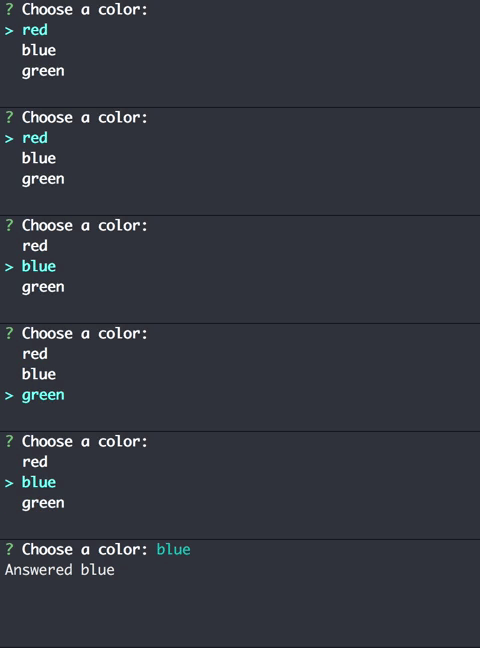
color := ""
prompt := &survey.Select{
    Message: "Choose a color:",
    Options: []string{"red", "blue", "green"},
}
survey.AskOne(prompt, &color, nil)
By default, the select prompt is limited to showing 7 options at a time
and will paginate lists of options longer than that. To increase, you can either
change the global survey.PageCount, or set the PageSize field on the prompt:
prompt := &survey.Select{..., PageSize: 10}
MultiSelect
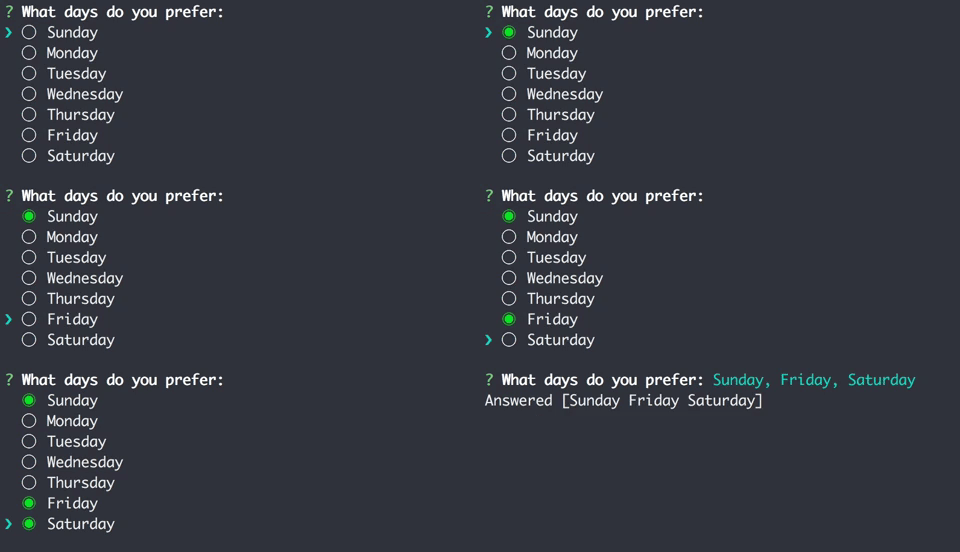
days := []string{}
prompt := &survey.MultiSelect{
    Message: "What days do you prefer:",
    Options: []string{"Sunday", "Monday", "Tuesday", "Wednesday", "Thursday", "Friday", "Saturday"},
}
survey.AskOne(prompt, &days, nil)
By default, the MultiSelect prompt is limited to showing 7 options at a time
and will paginate lists of options longer than that. To increase, you can either
change the global survey.PageCount, or set the PageSize field on the prompt:
prompt := &survey.MultiSelect{..., PageSize: 10}
Validation
Validating individual responses for a particular question can be done by defining a
Validate field on the survey.Question to be validated. This function takes an
interface{} type and returns an error to show to the user, prompting them for another
response:
q := &survey.Question{
    Prompt: &survey.Input{Message: "Hello world validation"},
    Validate: func (val interface{}) error {
        // since we are validating an Input, the assertion will always succeed
        if str, ok := val.(string) ; ok && len(str) > 10 {
            return errors.New("This response cannot be longer than 10 characters.")
        }
    }
}
Built-in Validators
survey comes prepackaged with a few validators to fit common situations. Currently these
validators include:
| name | valid types | description |
|---|---|---|
| Required | any | Rejects zero values of the response type |
| MinLength(n) | string | Enforces that a response is at least the given length |
| MaxLength(n) | string | Enforces that a response is no longer than the given length |
Help Text
All of the prompts have a Help field which can be defined to provide more information to your users:

&survey.Input{
    Message: "What is your phone number:",
    Help:    "Phone number should include the area code",
}
Changing the input rune
In some situations, ? is a perfectly valid response. To handle this, you can change the rune that survey
looks for by setting the HelpInputRune variable in survey/core:
import (
    "gopkg.in/AlecAivazis/survey.v1"
    surveyCore "gopkg.in/AlecAivazis/survey.v1/core"
)

number := ""
prompt := &survey.Input{
    Message: "If you have this need, please give me a reasonable message.",
    Help:    "I couldn't come up with one.",
}

surveyCore.HelpInputRune = '^'

survey.AskOne(prompt, &number, nil)
Custom Types
survey will assign prompt answers to your custom types if they implement this interface:
type settable interface {
    WriteAnswer(field string, value interface{}) error
}
Here is an example how to use them:
type MyValue struct {
    value string
}
func (my *MyValue) WriteAnswer(name string, value interface{}) error {
     my.value = value.(string)
}

myval := MyValue{}
survey.AskOne(
    &survey.Input{
        Message: "Enter something:",
    },
    &myval,
    nil,
)
Customizing Output
Customizing the icons and various parts of survey can easily be done by setting the following variables
in survey/core:
| name | default | description |
|---|---|---|
| ErrorIcon | ✘ | Before an error |
| HelpIcon | ⓘ | Before help text |
| QuestionIcon | ? | Before the message of a prompt |
| SelectFocusIcon | ❯ | Marks the current focus in Select and MultiSelect prompts |
| MarkedOptionIcon | ◉ | Marks a chosen selection in a MultiSelect prompt |
| UnmarkedOptionIcon | ◯ | Marks an unselected option in a MultiSelect prompt |
Versioning
This project tries to maintain semantic GitHub releases as closely as possible. As such, services like gopkg.in work very well to ensure non-breaking changes whenever you build your application. For example, importing v1 of survey could look something like
package main

import "gopkg.in/AlecAivazis/survey.v1"